48 Scripting with ecTorus
Level 4 · Researcher. The page exposes its state, its computed model and its whole engine as ecTorus in the
browser console. You will drive the page from the console, read the model, and redo claims of earlier chapters with
the engine. Read first: 24 Adding points and 29 Discrete logs.
Open the console with F12 (or Ctrl+Shift+J / Cmd+Option+J) on the visualizer’s tab. Every snippet below was run in the
page by the build of these tutorials, and its result compared with an independent computation; the comment after →
is that result. BigInts print with a trailing n.
The API
| member | what it is |
|---|---|
ecTorus.state |
a copy of the editable state (what Copy link encodes) |
ecTorus.set(patch) |
merge patch into the state and redraw, like typing into the panel |
ecTorus.model |
everything computed from the state: curve, facts, inputs, pts, op, rel, small, G, ordG, beta |
ecTorus.screenOf(key) |
the screen position of a drawn point ('p1', 'p2', 'sum', 'g', 'r') |
ecTorus.engine |
Curve, parsePoint, evalExpr, encodeSEC, sqrtMod, isProbablePrime, chord, turns, smallCurve, pointOrder, dlog, KNOWN |
ecTorus.selfTest() |
the 42 in-page checks: { pass, fail, items } |
Driving the page
ecTorus.set({ preset: 'custom', a: '0', b: '7', p: '223', g: '(47, 71)', p1: '5G', p2: 'G', op: 'add' }) builds the view below: F₂₂₃ with P₁ = 5G and P₂ = G.
Example 48.1 · ecTorus.set: 5G + G on F₂₂₃
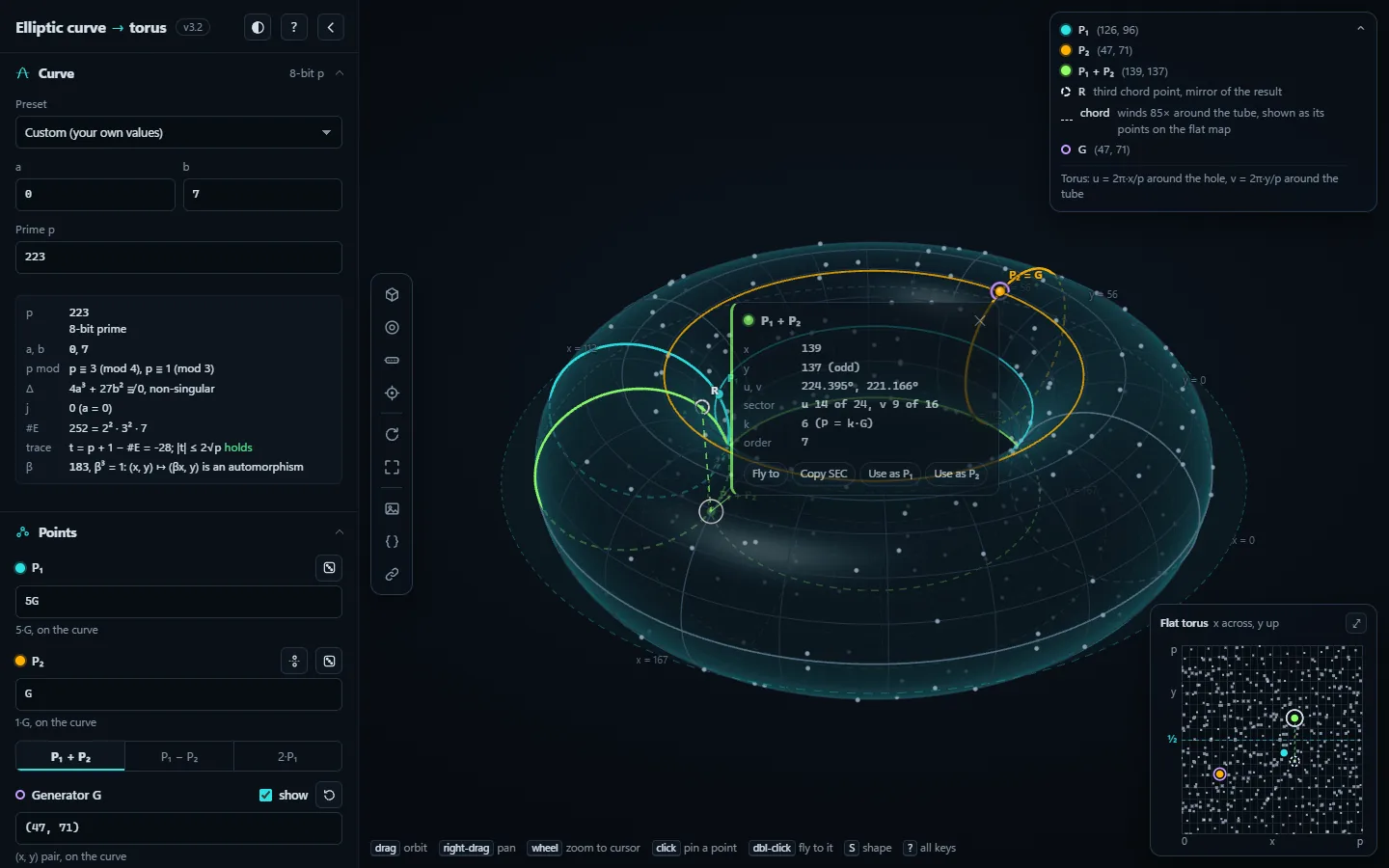
Open this view: 5G + G on F₂₂₃
Do it yourself
- In Curve, pick the preset y² = x³ + 7 over F₂₂₃, Programming Bitcoin.
- Type
5Gin P₁ andGin P₂. - In the 3D view, click the result to pin its card.
The model then answers, and the engine redoes 24’s chord and 29’s discrete log:
ecTorus.model.op.P
// → { x: 139n, y: 137n }
ecTorus.model.pts.sum.k
// → 6n
ecTorus.model.ordG
// → 21n
ecTorus.model.small.count
// → 252n
ecTorus.model.rel.find(([k]) => k === 'ord(G)')[1]
// → 21n
const { Curve, chord, dlog, turns } = ecTorus.engine;
const c = new Curve(0n, 7n, 223n), G = { x: 47n, y: 71n };
chord(c, G, c.mul(8n, G))
// → { type: 'secant', lambda: 3n, c: 153n, R: { x: 69n, y: 137n } }
dlog(c, G, { x: 69n, y: 86n }, 21n)
// → 9n
turns(47n, 223n)
// → 0.21076233183856496
ecTorus.engine.smallCurve(0n, 7n, 223n, false).count
// → 252n
ecTorus.selfTest().fail
// → 0
model.pts holds one record per drawn point (p1, p2, sum, g, r, and the β-siblings p1b1, p1b2, …), each with
P (BigInt coordinates), onCurve, tu and tv (turns), k or kTyped, order, and after a render pos (its 3D
position). model.facts and model.rel are the rows of Curve facts and Relations as [label, html] pairs.
The engine on secp256k1
Example 48.2 · The engine on secp256k1
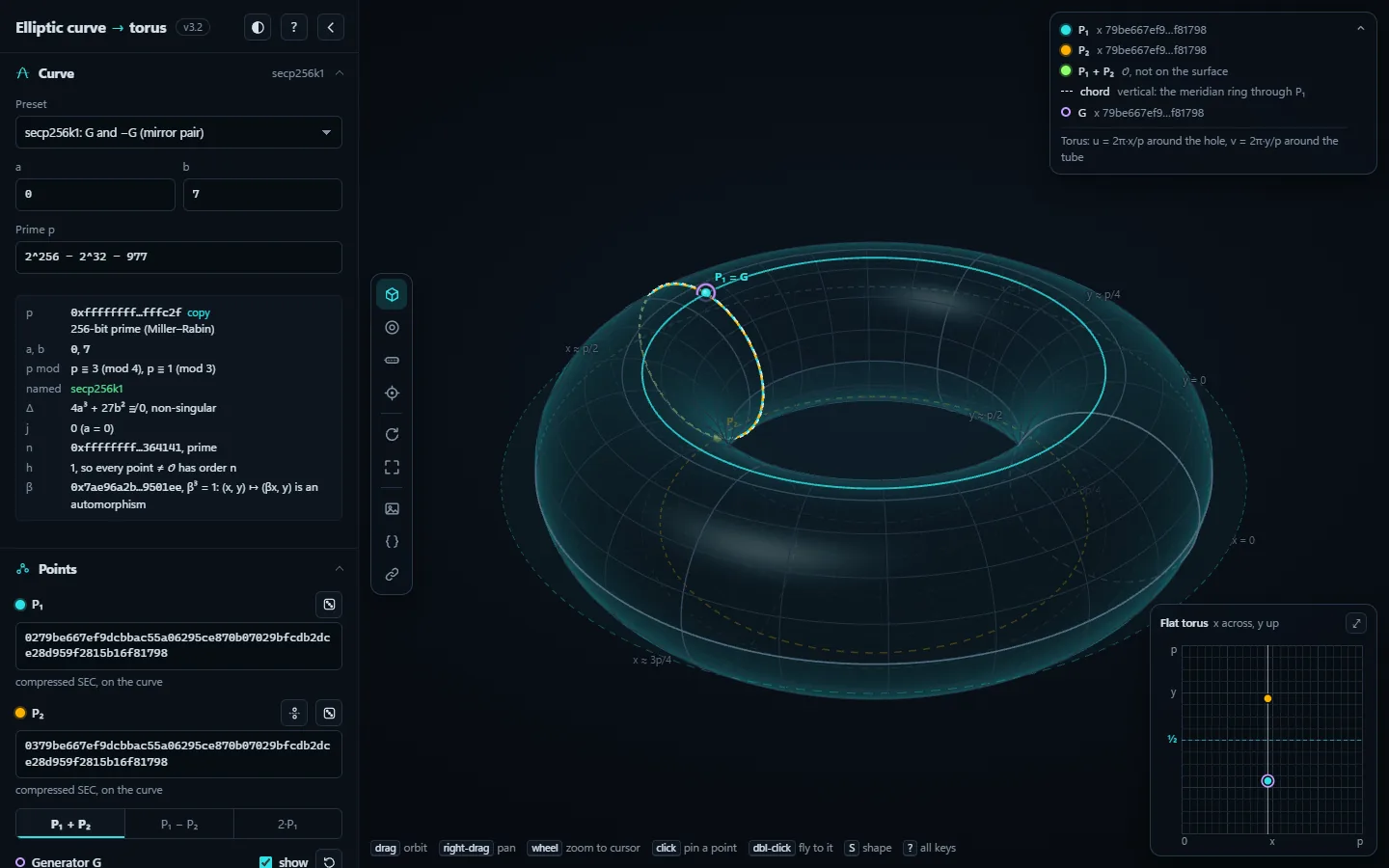
Open this view: the default view
Do it yourself
- In Curve, pick the preset secp256k1: G and −G (mirror pair).
ecTorus.engine.evalExpr('2^256 - 2^32 - 977')
// → 115792089237316195423570985008687907853269984665640564039457584007908834671663n
const { Curve, KNOWN, encodeSEC } = ecTorus.engine;
const k1 = KNOWN[0], c = new Curve(k1.a, k1.b, k1.p);
encodeSEC(c.mul(7n, k1.G), c)
// → '025cbdf0646e5db4eaa398f365f2ea7a0e3d419b7e0330e39ce92bddedcac4f9bc'
ecTorus.engine.parsePoint('7G', { curve: c, G: k1.G }).kind
// → 'scalar'
ecTorus.engine.isProbablePrime(k1.n)
// → true
Curve works on any (a, b, p): add, dbl, neg, mul(k, P) (Jacobian, k may be negative), isOn, eq, bPrime,
disc, jInvariant. Points are { x, y } objects with BigInt coordinates, and null is 𝒪. Errors from parsePoint
are EcErrors with the same messages the panel shows.
Try it yourself
- Walk the multiples from the console:
for (let k = 1; k <= 21; k++) ecTorus.set({ p1: k + 'G' })runs P₁ through G to 21G = 𝒪 (the last one is “nothing to draw”). - Read Δu and Δv for the current pair:
ecTorus.model.rel.find(([k]) => k === 'Δu, Δv')[1]. - Count points of your own curve:
ecTorus.engine.smallCurve(1n, 1n, 23n, false).count(chapter 22 gives 28).
Recap
ecTorus.setdrives the page;ecTorus.stateandecTorus.modelread it;screenOflocates drawn points.ecTorus.engineis the full BigInt engine: curves, parsing, encodings, chords, counting, orders, discrete logs.- Everything the panel shows can be recomputed in the console, which is how these tutorials check themselves.
Next: 49 Trusting the numbers.