33 Key formats
Level 3 · Bitcoiner. Every way a public key is written (SEC compressed, uncompressed and hybrid, BIP340 x-only, plain coordinates), how the visualizer reads each one, and every error message it gives. Read first: 32 Private key → public key.
The encodings
With L = the field size in bytes (32 for secp256k1 and P-256, 1 for a toy curve with p < 256):
| prefix | length | contents | read as |
|---|---|---|---|
02 / 03 |
1 + L | x; the prefix says y is even / odd | compressed SEC: lift x, pick y by parity |
04 |
1 + 2L | x, y | uncompressed SEC; drawn even when off the curve |
06 / 07 |
1 + 2L | x, y; the prefix repeats y’s parity | hybrid SEC; the parity bit is checked |
| none | L | x | x-only (BIP340 lift_x): the point with x and even y |
(x, y) |
any | decimal, hex or expressions | an affine pair, reduced mod p |
kG, O |
any | a scalar, or the point at infinity | see 32 |
The length decides first: a string of exactly L bytes is x-only whatever its first byte is, which is why 02 alone
is an x-only key on F₂₂₃ (14 Two points).
Example 33.1 · G in every format
The picture shows G written as a hybrid key with the wrong parity bit:
07 + x + y, although y is even.
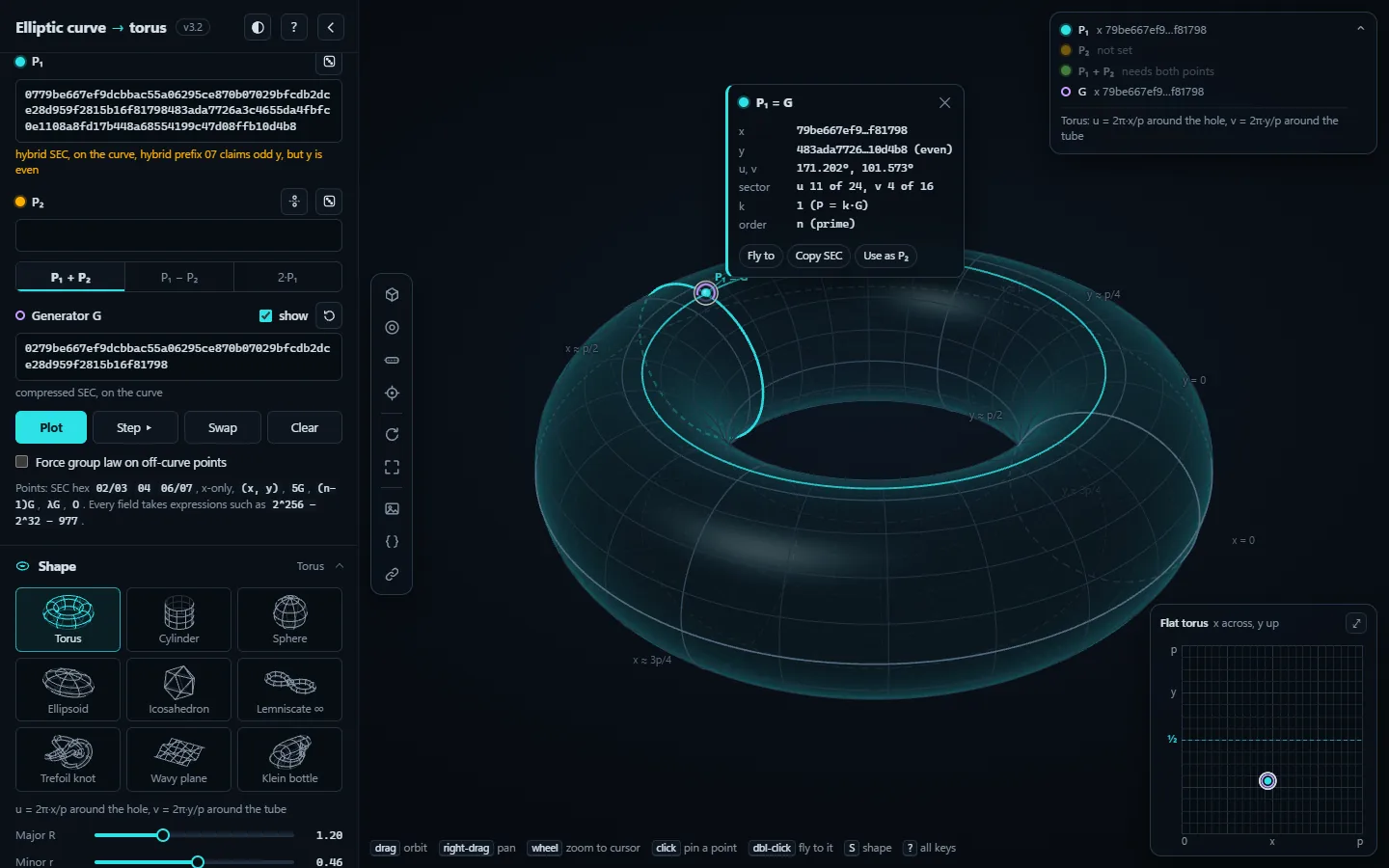
Open this view: G as a 07 hybrid key
| typed in P₁ | format | the message | open |
|---|---|---|---|
0279be667ef9dcbbac55a06295ce870b07029bfcdb2dce28d959f2815b16f81798 |
compressed, even y | compressed SEC, on the curve | open |
0379be667ef9dcbbac55a06295ce870b07029bfcdb2dce28d959f2815b16f81798 |
compressed, odd y: −G | compressed SEC, on the curve | open |
0479be667ef9dcbbac55a06295ce870b07029bfcdb2dce28d959f2815b16f81798483ada7726a3c4655da4fbfc0e1108a8fd17b448a68554199c47d08ffb10d4b8 |
uncompressed | uncompressed SEC, on the curve | open |
0679be667ef9dcbbac55a06295ce870b07029bfcdb2dce28d959f2815b16f81798483ada7726a3c4655da4fbfc0e1108a8fd17b448a68554199c47d08ffb10d4b8 |
hybrid, parity bit even (correct) | hybrid SEC, on the curve | open |
0779be667ef9dcbbac55a06295ce870b07029bfcdb2dce28d959f2815b16f81798483ada7726a3c4655da4fbfc0e1108a8fd17b448a68554199c47d08ffb10d4b8 |
hybrid, parity bit odd (wrong) | hybrid SEC, on the curve, hybrid prefix 07 claims odd y, but y is even | open |
79be667ef9dcbbac55a06295ce870b07029bfcdb2dce28d959f2815b16f81798 |
x-only (32 bytes, BIP340) | x-only (BIP340, even y), on the curve | open |
(0x79be667ef9dcbbac55a06295ce870b07029bfcdb2dce28d959f2815b16f81798, 0x483ada7726a3c4655da4fbfc0e1108a8fd17b448a68554199c47d08ffb10d4b8) |
(x, y) in hex | (x, y) pair, on the curve | open |
G |
the scalar 1 | 1·G, on the curve | open |
Do it yourself
- In Curve, pick the preset secp256k1: G and −G (mirror pair).
- Type
0779be667ef9dcbbac55a06295ce870b07029bfcdb2dce28d959f2815b16f81798483ada7726a3c4655da4fbfc0e1108a8fd17b448a68554199c47d08ffb10d4b8in P₁. - Empty P₂.
- In the 3D view, click P₁ to pin its card.
- Read the Points section in the panel.
Look at: the message, in amber: “hybrid SEC, on the curve, hybrid prefix 07 claims odd y, but y is even”. The point is read and drawn; the warning says what is wrong. The Inspector lists G’s three SEC encodings with copy buttons:
- SEC 02/03:
02+ x =0279be667ef9dcbbac55a06295ce870b07029bfcdb2dce28d959f2815b16f81798 - SEC 04:
0479be667ef9dcbbac55a06295ce870b07029bfcdb2dce28d959f2815b16f81798483ada7726a3c4655da4fbfc0e1108a8fd17b448a68554199c47d08ffb10d4b8 - SEC 06/07:
0679be667ef9dcbbac55a06295ce870b07029bfcdb2dce28d959f2815b16f81798483ada7726a3c4655da4fbfc0e1108a8fd17b448a68554199c47d08ffb10d4b8
The table types G in every format into P₁; each row opens in the visualizer.
Why: hybrid keys (06/07) came from an old standard and repeat the parity that the y in the key already shows. libsecp256k1 refuses one whose bit disagrees with y (so does idleCore’s decoder, which follows its rules; the tutorials’ scripts check it on this very key). The visualizer is more forgiving, because it is a viewer: it shows the point and flags the lie.
The errors
Example 33.2 · An x with no point: the quadratic twist
02 followed by x = 5: 5³ + 7 = 132, and 132 has no square root mod p.
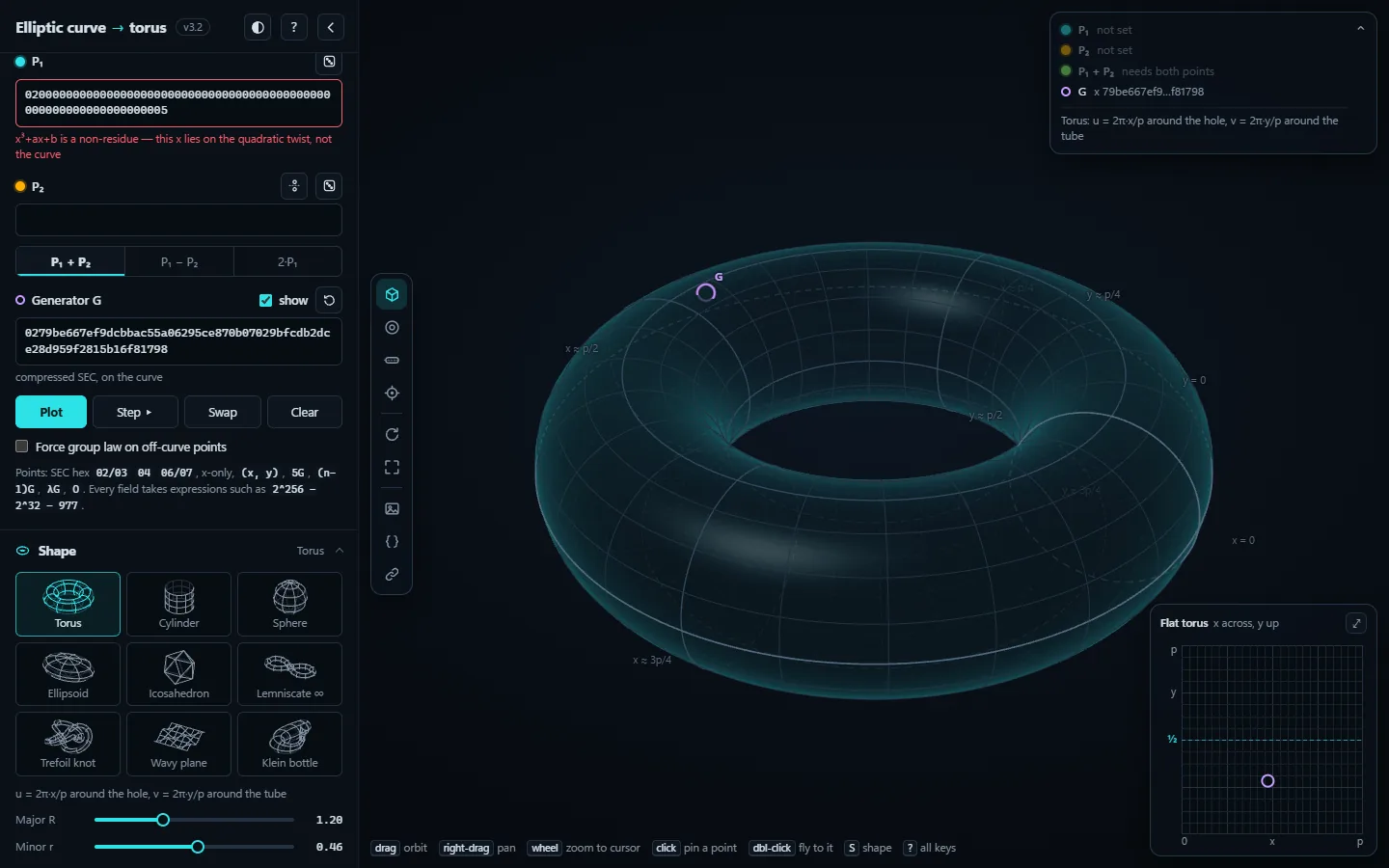
Open this view: 02 with x = 5
| typed in P₁ | what is wrong | the message | open |
|---|---|---|---|
0279be667ef9dcbbac55a06295ce870b07029bfcdb2dce28d959f2815b16f8179800 |
one byte too many | compressed SEC is 33 bytes for this p (got 34) | open |
0479be667ef9dcbbac55a06295ce870b07029bfcdb2dce28d959f2815b16f81798483ada7726a3c4655da4fbfc0e1108a8fd17b448a68554199c47d08ffb10d4 |
one byte too few | 04-prefixed SEC is 65 bytes for this p (got 64) | open |
0279be667ef9dcbbac55a06295ce870b07029bfcdb2dce28d959f2815b16f8179 |
an odd number of hex digits | odd number of hex digits (65) | open |
02ffffffffffffffffffffffffffffffffffffffffffffffffffffffffffffffff |
x ≥ p | x ≥ p | open |
020000000000000000000000000000000000000000000000000000000000000005 |
x = 5: no y on secp256k1 | x³+ax+b is a non-residue — this x lies on the quadratic twist, not the curve | open |
0000000000000000000000000000000000000000000000000000000000000005 |
the same x as x-only | x-only: x³+ax+b is a non-residue — this x lies on the quadratic twist, not the curve | open |
0479be667ef9dcbbac55a06295ce870b07029bfcdb2dce28d959f2815b16f81798ffffffffffffffffffffffffffffffffffffffffffffffffffffffffffffffff |
y ≥ p | coordinate ≥ p | open |
0579be667ef9dcbbac55a06295ce870b07029bfcdb2dce28d959f2815b16f81798 |
an unknown prefix | unknown prefix 05 (expected 02/03/04/06/07, or 32-byte x-only) | open |
hello |
not hex at all | not a point: use SEC hex (02/03/04/06/07…), (x, y), kG or O | open |
Do it yourself
- In Curve, pick the preset secp256k1: G and −G (mirror pair).
- Type
020000000000000000000000000000000000000000000000000000000000000005in P₁. - Empty P₂.
- Read the Points section in the panel.
Look at: the red message: “x³+ax+b is a non-residue — this x lies on the quadratic twist, not the curve”. The table lists every error message you can meet, with an input that triggers it.
Why: about half of all x values have no point on the curve: x³ + 7 is not a square mod p for them. Those x belong to the curve’s quadratic twist instead, the curve y² = x³ + 7d for a non-square d (44 Quadratic twists). A decoder must refuse them; a careless one that computes a “square root” anyway produces a point off the curve, which is the door to 36 Invalid points.
Try it yourself
- Copy the SEC 04 row of any point from the Inspector and paste it into P₂: Relations says P₂ = P₁.
- Type G’s x with the prefix
03: that is −G. Then type the x alone: which one of the two do you get? - On F₂₂₃ (preset “Programming Bitcoin”), type
0324,042f47and062f47. Which ones are on the curve, and which one gets a warning?
Recap
- 02/03 + x (compressed), 04 + x + y (uncompressed), 06/07 + x + y (hybrid, parity checked), x alone (x-only, even y).
- The byte length L follows p; a string of exactly L bytes is always read as x-only.
- Every refusal names its reason: wrong length, odd digits, x or y ≥ p, an x on the twist, an unknown prefix.
Next: 34 Parity, 02/03 and Taproot.